File Search
A step-by-step guide to building and configuring assistants for social and web chatbots
File Search
What Is File Search?
File Search allows your assistant to access and retrieve information from uploaded files, enabling it to provide more accurate and context-specific responses. This feature is particularly useful for assistants that need to reference detailed information, such as FAQs, product catalogs, user manuals, or company policies.
Supported File Formats
File Search supports the following file formats:
- JSON
- TXT
- CSV
The maximum file size is 500MB. Ensure your files are well-organized and contain clear, structured information to maximize the assistant’s ability to retrieve relevant data.
How to Use File Search
-
Enable File Search:
- During the assistant creation process, toggle the Enable File Search option in the form.

- If you’ve already created your assistant, follow these steps to enable File Search:
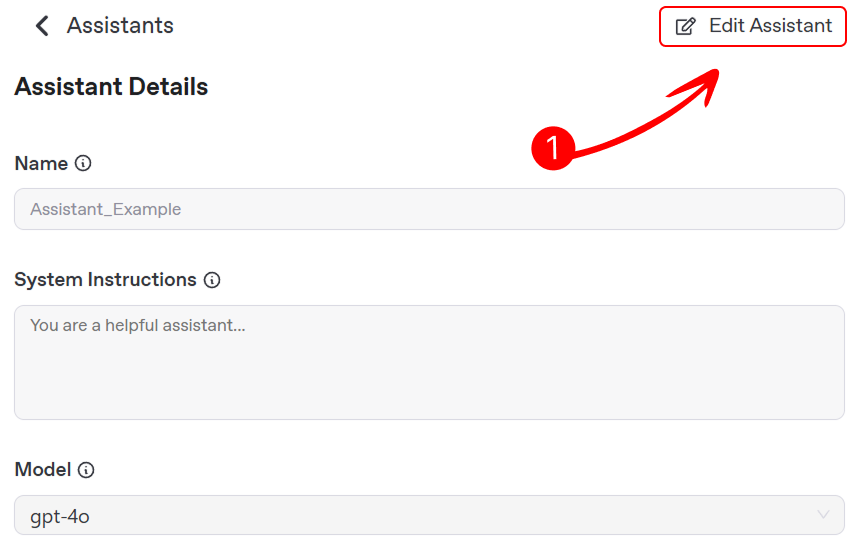
- Select your assistant from the Assistants page, go to its details tab, and click Edit Assistant to access the settings.
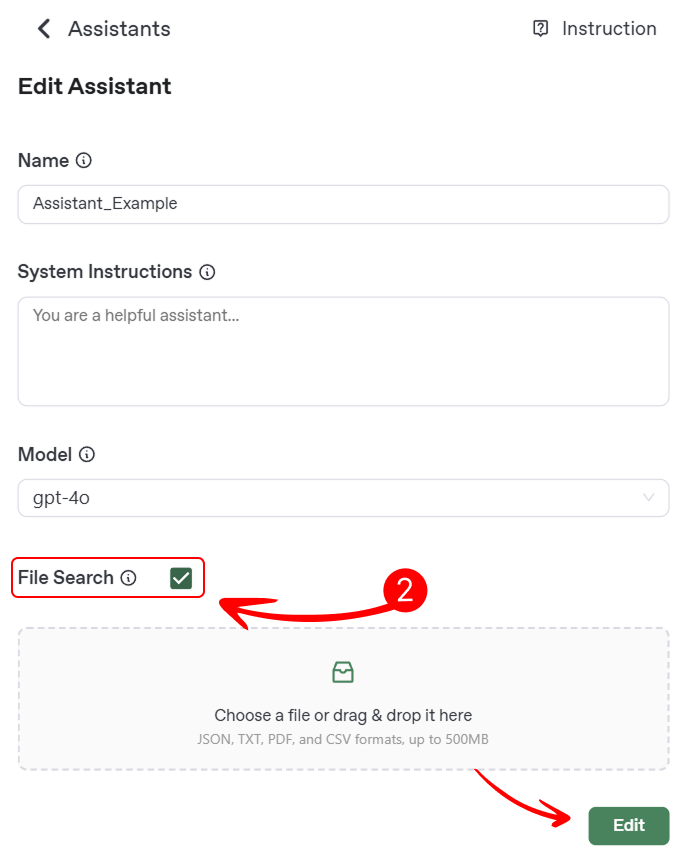
- Toggle the Enable File Search option to allow file uploads, then click Edit to apply the changes.
- Select your assistant from the Assistants page, go to its details tab, and click Edit Assistant to access the settings.
- During the assistant creation process, toggle the Enable File Search option in the form.
-
Upload Files:
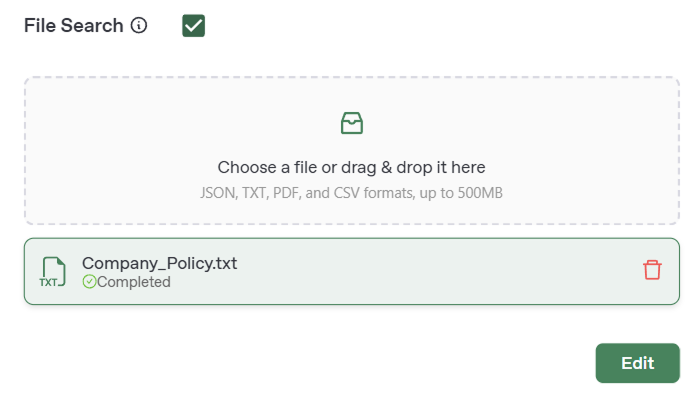
- Drag and drop your files into the Upload Files field, or click to select files from your device.
- Example: Upload a PDF of your company’s FAQ document to allow the assistant to answer common questions.
-
Test File Search:
- After uploading files, test your assistant by asking questions related to the content of the files. On the Playground page, you can select your assistant and test its responses in real-time.
- Example: If you uploaded a product catalog, ask “What products do you sell?” and verify that the assistant provides accurate details from the catalog.
Best Practices for File Search
- Organize Your Files: Use clear, structured formats (e.g., headings in PDFs, key-value pairs in JSON) to make it easier for the assistant to retrieve information.
- Keep Files Up-to-Date: Regularly update your files to ensure the assistant has access to the latest information.
- Test Thoroughly: Test the assistant with a variety of queries to ensure it can accurately retrieve and interpret information from the files.
- Limit File Size: While the maximum file size is 500MB, smaller files (e.g., under 100MB) are processed more efficiently.